FabFilter Total Bundle 2026.3 – V.R
At a Glance
| Format | VST3, AAX, CLAP |
|---|---|
| Platform | WiN |
| Size | 60 MB |
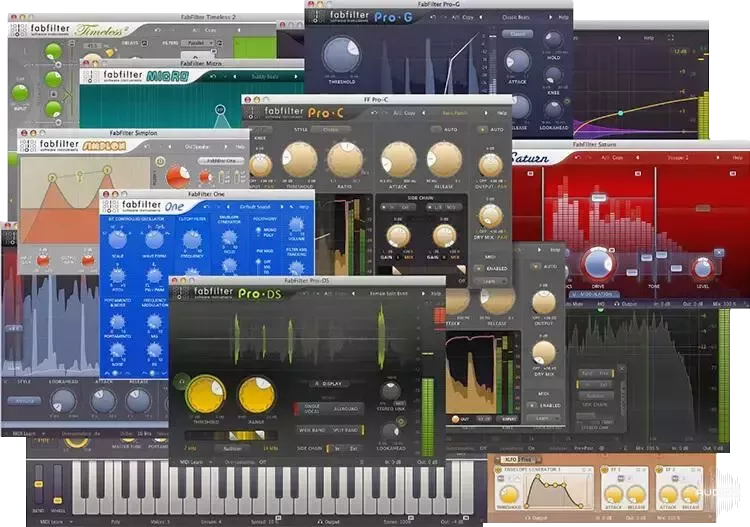
⚡ Professional mixing and mastering tools ⚡ ⚡ Creative effect and synthesizer plug-ins ⚡ The Total Bundle is a set of all FabFilter plug-ins. With this bundle, you get our professional EQ, reverb, compressor, multiband dynamics, limiter, de-esser and gate/expander, creative multiband distortion, delay, filter and synthesizer plug-ins. Included: ★ FabFilter Micro v1.3.1 ★ FabFilter One v3.5.1 ★ FabFilter Pro-C 3 v3.0.1 ★ FabFilter Pro-DS v1.3.1 ★ FabFilter Pro-G v1.4.1 ★ FabFilter Pro-L 2 v2.2.5 ★ FabFilter Pro-MB v1.3.2 ★ FabFilter Pro-Q 4 v4.1.1 ★ FabFilter Pro-R 2 v2.0.5 ★ FabFilter Saturn v2.1.2 ★ FabFilter Simplon v1.4.1 ★ FabFilter Timeless v3.0.9 ★ FabFilter Twin v3.0.6 ★ FabFilter Volcano v3.0.8 (optional) legacy version for compatibility with older projects ★ FabFilter Pro-C v1.2.3 ★ FabFilter Pro-C 2 v2.2.1 ★ FabFilter Pro-L v1.3.6 ★ FabFilter Pro-Q v1.2.3 ★ FabFilter Pro-Q 2 v2.2.9 ★ FabFilter Pro-Q 3 v3.2.8 ★ FabFilter Pro-R v1.1.9 ★ FabFilter Saturn v1.3.0 ★ FabFilter Timeless 2 v2.4.0 ★ FabFilter Twin 2 v2.4.0 ★ FabFilter Volcano 2 v2.4.0 What’s new? All plug-ins: Fixed problems with interface sizing and scaling that could cause the interface to end up too large or impossible to resize on all platforms, but particularly with Logic Pro on macOS. You can now drag-and-drop preset files onto the interface in all FabFilter plug-ins. The preset quick menu (i.e. right-click on the preset button) now offers Copy and Paste items in all FabFilter plug-ins. Minor bug fixes and improvements. Pro-Q 4: Clicking the slope value in the parameter value display (for a LP/HP band) will now open a slope menu instead of letting you change the slope by dragging up or down. The new behavior is the same as clicking the slope button in the band controls. Fixed a bug that caused the Side Chain option in the EQ Match reference menu not to work. Fixed a bug that sometimes caused loading a previously saved EQ Match reference spectrum to result in an empty spectrum. Fixed a bug in EQ Match that caused comparing a signal to itself to yield around a 1 dB difference, instead of a flat spectrum. Fixed a crash in the instance list that could occur when the track order is updated (for example on stop/start playback) while the mouse is over an instance. Fixed a possible crash when working with EQ Match in the instance list, which would occur when removing the Pro-Q 4 instance in your DAW via which the currently active EQ Match process was initiated. Fixed a bug that caused the incorrect latency to be reported when using spectral bands in combination with Very High or Maximum processing resolutions. Fixed a bug that caused the processing warning icon to be shown when using Zero Latency processing, while the (unused) processing resolution parameter was still set to Very High or Maximum. Fixed a possible crash when having two Pro-Q 4 windows open showing the instance list. Fixed an issue that would cause the EQ Match process to abort as soon as Pro-Q 4 re-orders instances in the instance list. Pro-C 3: The Show Input Level Meter option in the Help menu is now remembered correctly. We now allow free resizing to take the interface in and out of compact mode (VST3 and Clap only). Fixed missing Eucon mapping for Avid control surfaces. Added more detailed information about the Vari-Mu and TTM styles in the Help File. Pro-Q 4, Pro-C 3, Pro-DS and Pro-G: Fixed a crash when closing the interface with a text editor open on Windows (for example when double-clicking to type a parameter value). Pro-Q 4 and Pro-C 3 Fixed issues with pasting EQ bands over a current selection in Pro Tools, where even the newly pasted bands would be accidentally deleted, ending up with no bands at all. Pro-DS: Fixed a bug that caused the Mode, Processing and Stereo Link buttons in the instance interface (shown in Pro-Q’s instance list) to show the wrong option as the current setting. Volcano 3: Fixed a bug in the Clean style that caused 6 dB/oct Bell filters to still introduce saturation/coloring. home page https://www.fabfilter.com/shop download from free file storage –> click to show download links download from any file hoster with just one LinkSnappy account download from more than 100 file hosters at once with LinkSnappy. audioz mirror http://http://peeplink.in/e0d7961ad4d4 FabFilter Total Bundle 2026.3 – V.R has been exclusively released on AudioZ by Zetas who chose to ask not to post mirrors. Please respect the uploader’s wishes. Zetas − +59 + 4993 / 15